 Kiln
Kiln DocumentationTools
Databases
Connect to PostgreSQL, MySQL, MariaDB and SQLite, run SQL with completion, edit SELECT results and change table structure with reviewed SQL.
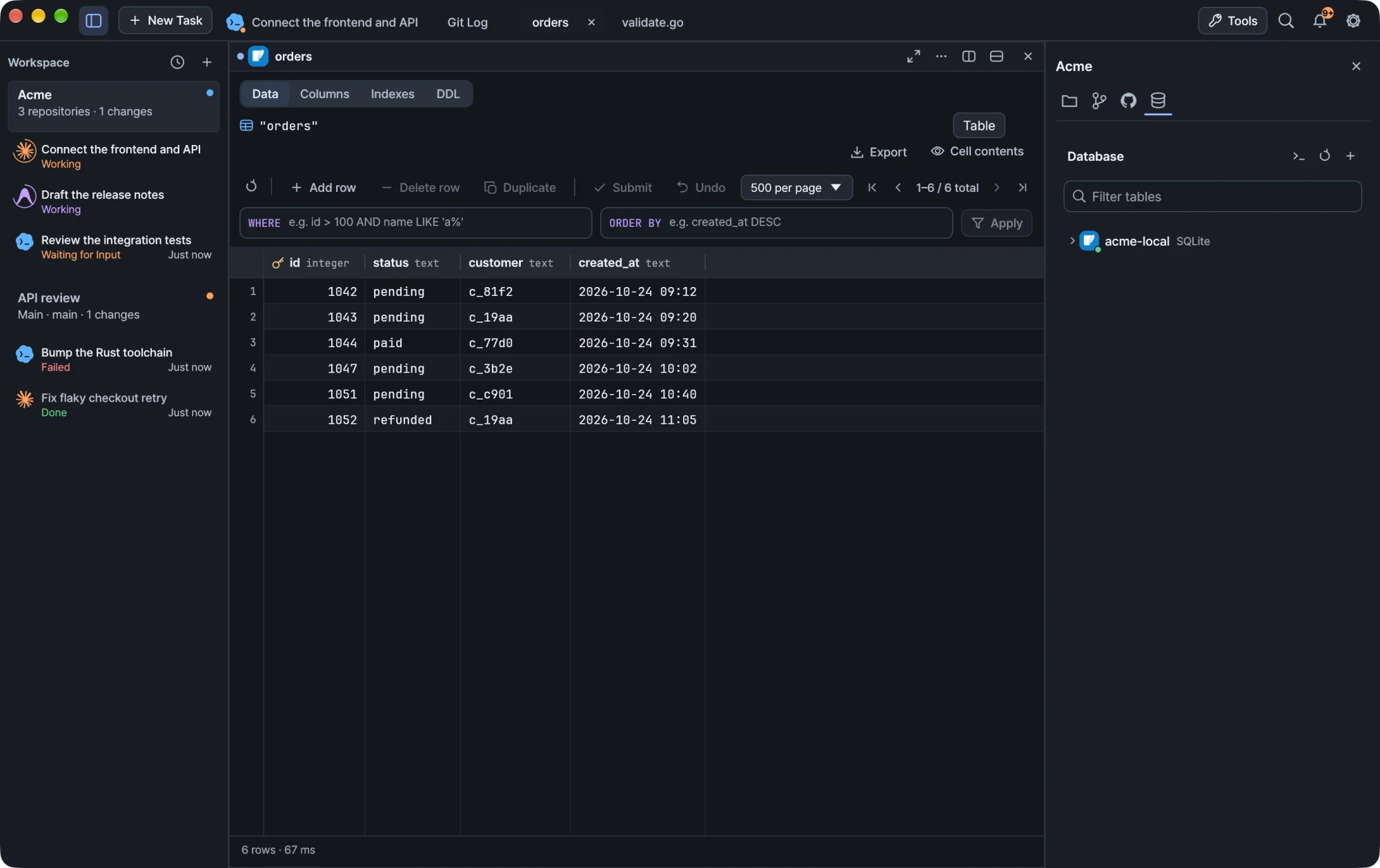
Kiln includes database tools next to your terminals: a connection explorer, a SQL console with completion, editable result grids and table structure forms. Nothing is written to the database until you apply it.
Connect
Select Database (the database icon) in the workspace inspector, or choose databases from the titlebar Tools menu. Add a connection, then open a table or a SQL console.
Kiln supports PostgreSQL, MySQL, MariaDB and SQLite. Each one uses its own identifier quoting and metadata queries. Connection secrets are kept in Kiln's credential store.
Opening database tools does not change the workspace root or move an agent into another repository.
Run SQL
| Action | How |
|---|---|
| Run the statement at the caret | Run or ⌘Enter |
| Run only the selected text | Select it, then Run or ⌘Enter |
| Run every statement in the editor | Run all or ⌘⌥Enter |
A semicolon belongs to the statement before it, and semicolons inside strings, comments or quoted identifiers do not split a statement. A blank or comment-only selection runs nothing.
SQL completion
Suggestions appear as you type an identifier, or an alias followed by a dot. You can also open them with ⌃Space, ⌥Esc or the console's code icon. ⌘Space works when macOS passes it to Kiln. Kiln does not override Spotlight.
Tip macOS may use
⌃Spaceto switch input sources. The code icon and⌥Escwork without changing your Mac's shortcuts.
What you get depends on where the caret is:
| Context | Suggestions |
|---|---|
After FROM or JOIN |
Tables and schemas. Table names are inserted with their schema. |
SELECT, WHERE, JOIN ... ON, UPDATE ... SET, INSERT column list |
Columns of the referenced tables, including aliases defined after the caret |
The connection's dialect also supplies common SQL keywords and function names. Inserting a function places the caret inside its parentheses.
Browse with the arrow keys or the mouse wheel, insert with Tab or Enter, and dismiss with Esc. Hover a candidate to see its full name and metadata. Completion never runs SQL.
Keep metadata current
- Schema changes you run in this console refresh completion automatically.
- After changes made elsewhere, use the refresh icon.
- If loading metadata fails, your SQL stays as it is. Retry with the refresh icon.
Metadata loads in the background and never reopens a connection you closed.
What completion does not know
Completion reads the database catalog, separately from your console session, so it does not see TEMP objects, SQLite ATTACH, MySQL USE or PostgreSQL search_path changes. Use explicit schema names for persistent tables. Columns of CTEs and derived tables are not inferred, and Kiln hides table suggestions that would claim those columns wrongly. Keyword and function lists cover common syntax, not every server extension.
SQL completion never sends query text or table rows to an external AI service.
Edit query results
For a supported single-table SELECT, double-click a cell, or press Enter or F2, to change it. Changes stay local until you choose Apply changes. Undo discards them.
Use the value sidebar for longer values. Stage its text with Apply to cell, or reset it, before you select another cell or run another query. Copying selected cells includes staged values.
Which results can be edited
The result must come from one permanent table, using its columns directly. Aliases and filters are fine. Include every column of the primary key, or of a non-null unique key. The key does not need to be called id.
These stay read-only, and Kiln explains why:
- Joins, aggregates and computed columns
- The same source column selected twice
- Views and temporary tables
- Results without the complete row key
- Generated, binary and unsupported column types
Result editing works with PostgreSQL, SQLite, and MySQL or MariaDB with transactional InnoDB tables. It does not insert or delete rows. Use SQL for those.
How changes are applied
Kiln writes your changes in a separate transaction, using the row key and the original values you saw. Each changed row must match exactly one row in the database. If a row was deleted, changed by someone else or is ambiguous, the whole transaction fails and your local changes stay for review.
Before writing, Kiln locks the table and rechecks its identity and its column and key definitions. If the structure changed since your query, run the query again. Applying changes does not commit an explicit BEGIN in your console.
If the write succeeds but the refresh fails, Kiln tells you the write was saved and makes the stale result read-only. It never resubmits a change automatically.
Tables, columns and indexes
Right-click a table in the explorer for Open table, Edit table… and Drop table…. Edit table… opens one dialog with Columns, Indexes and DDL, plus table rename. Views open in the same structure browser, read-only.
Open a table to switch between Data, Columns, Indexes and DDL in its tab. DDL can be refreshed and copied.
Columns
Each column row offers edit, rename and drop. Use Add column to set a name, SQL type, nullability and an optional default. String defaults need SQL quotes, for example 'guest', while CURRENT_TIMESTAMP is an expression. Generated or identity columns and primary-key removal need manual DDL.
Indexes
Indexes lists key columns in order, uniqueness, method and the full definition. To add an index, select columns, set their order and direction, and optionally make it unique. Expression, partial and engine-specific indexes can be created in the SQL console. Primary-key and constraint-owned indexes cannot be dropped from this form.
Review before applying
Every structure change follows Preview SQL → review → Apply to database.
- Opening a form or previewing never runs DDL.
- Editing a field clears the preview and its approval.
- Deleting a table also asks you to type its exact name.
- Pending row edits in an open table block structure changes.
- If an operation fails, your input is kept so you can correct it.
PostgreSQL applies changes in a transaction. MySQL and MariaDB run a single DDL statement, without multi-statement rollback. For SQLite, attribute edits rebuild the table in a transaction, keeping values, indexes, triggers and dependent views, and roll back on failure. Dependent objects can block a column or table drop. Kiln does not silently delete them.
Closing and recovery
Kiln will not close a tab, workspace or the app while a database write is still running. The block clears when the write finishes, even if the tab is hidden.
When you keep work on exit, staged values and unfinished text are saved locally. On restart they appear in a review-only section with the original query and values, which you can copy, export or delete. Nothing is rerun or resubmitted. Run the query again and compare before you re-enter a change.
Warning Local recovery files can contain database values. After an abrupt exit during a write, check whether the database already committed it before applying again.
Windows
Database tools work the same on Windows. Closing the window waits for running database writes, as on macOS.