 Kiln
Kiln DocumentationGet started
AI agent IDE: getting started
Kiln is a terminal-first IDE for agent work that keeps terminals, AI agents, Git, files and databases in one native workspace.
Kiln is a terminal-first IDE for agent work. It brings terminals, AI agents, Git, files and databases into one native app for macOS and Windows, so the whole task stays in view.
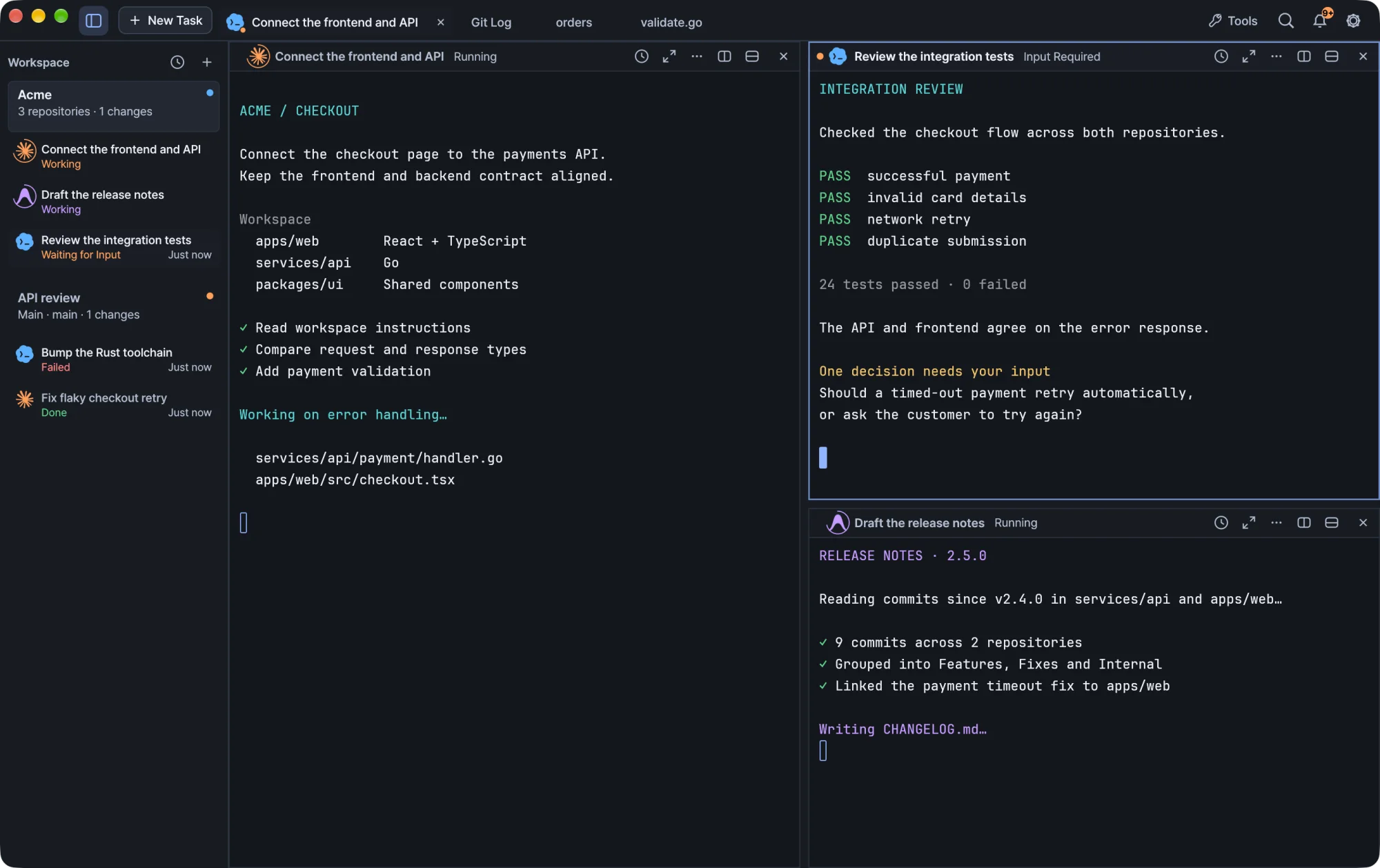
Open a single repository, or a parent folder that holds your frontend, backend and shared libraries. Run Claude Code, Codex or Antigravity in a terminal panel, watch which tasks need you, and review the result without leaving the window.
Core concepts
Workspace
A workspace is a named view of a folder. It keeps its own tasks, terminal sessions, split layout and unsent requests. One folder can have several workspaces, for example API review and Documentation, and each one is restored independently when Kiln reopens. Files and Git history belong to the folder, so every workspace for that folder shares them.
The folder can be one repository or a parent directory with several repositories. Your agent works from that shared root, while Git operations target the repository you select. See Workspaces and tasks.
Task
A task is the work running in a workspace's terminal: a shell you use directly, or an agent you start with New Task. The sidebar lists tasks under each workspace and shows their reported state:
| State | Meaning |
|---|---|
| Working | The agent or command reports that it is working. |
| Waiting for Input | The agent is waiting for your answer. |
| Done | The agent reported that it finished. |
| Failed | The agent or command reported a failure. |
When a session does not report its state, Kiln shows it as an open session instead of guessing from terminal output. An idle terminal is not treated as a completed task. Click a task to jump straight to its workspace, tab and split.
Panels and splits
Each terminal lives in a panel. Panel headers have controls to split right, split down and close. Drag a panel's title onto another panel to rearrange the layout; the move keeps the terminal session and its running process. See Splits and pane layout.
Inspector and tools
The right-hand workspace inspector holds Files, Changes, GitHub and a database icon for connections, tables and SQL consoles. The titlebar Tools menu lists files, search, source control, GitHub, databases, remote connections and problems together, and opens each one alongside your current work. In compact windows, Back to Task returns you to the terminal.
Session daemon
A separate local daemon owns your terminals. Closing the Kiln window leaves its shells and agents running, and reopening Kiln brings you back to them. Updates keep running terminals alive too. A system reboot or explicitly stopping the daemon is different from closing the window and can end sessions. See Sessions that outlive the window.
Notifications
Agents and scripts can report activity and send notifications through local terminal escape sequences or the kiln activity and kiln notify commands. These do not send your prompt to another service. The notification center keeps recent notifications and links each one to its session, and reading a notification clears that session's attention state. On Windows, agent notifications also appear as Windows toasts. See Terminal.
What you need
- macOS 11 or later on Apple Silicon, or Windows 11 on x64 or ARM64.
- The agent CLIs you plan to use: Claude Code, Codex or Antigravity (
agy), plusghfor GitHub. Kiln does not include a subscription to any agent. Install and sign in to the tools you use.
The app is available in English, Korean, Japanese and Simplified Chinese.
Where to go next
| Page | What you will find |
|---|---|
| Install and update | Install on macOS or Windows, first launch, updates and language |
| Workspaces and tasks | Named workspaces, multi-repository folders, the task list, splits and drafts |
| Terminal | Shell integration, activity, command history, completion and connection recovery |
| Agents | Starting Claude Code, Codex and Antigravity tasks and reading their states |
| Accounts | Agent profiles, browser sign-in and account switching |
| Conversations and updates | Conversation sync between agents and CLI updates |
| Git and GitHub | History, squash, cherry-pick, diffs and pull requests |
| Editor and search | File editing, language servers, search and problems |
| Databases | Connections, SQL console and table editing |
| Remote files and SSH | Object storage, FTP/SFTP and SSH terminals |